Arrow LED Tool
 An Arrow LED Tool object is an image of an arrow-shaped LED that indicates a status by color. The Active property sets the default status of the LED. If the object is associated with a point, the status shown in Run mode is set by the value of a point. This tool can be used only with digital points.
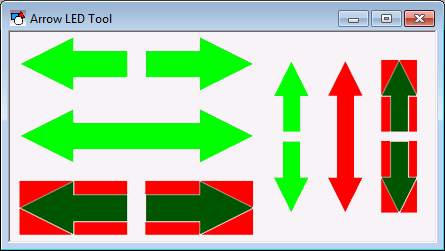
To associate the object with a point use the point identifier properties to form a fully qualified CygNet tag string. The point identifier properties are [1:SiteService], [2:Point ID], [3:Long Point ID], [4:Facility ID], and [5:UDC]. If the object is on a templated screen, only use the [5:UDC] property.
The active, or illuminated, color is specified by the ActiveColor property. If the AutoInactiveColor property is set to 1 - Yes, the inactive color is displayed as one-third the intensity of the active color. If AutoInactiveColor is set to 0 - No, the inactive color is that specified by the InactiveColor property. The BackGroundColor property specifies the color of the fill area between the LED and the object boundary.
The arrow direction and arrow ends are specified by the Style property. If you change the direction, you will also have to adjust the object’s boundary to match. An Arrow LED Tool object cannot be rotated.
The ArrowBodyLength and ArrowHeadSize properties can be used to adjust the size of the arrowhead(s). If the AutoSize property is set to 1 - Yes, the ArrowHeadSize property value will always be same as the object’s Height value and the ArrowBodyLength property value will always be 20 pixels less than the object’s Width value.
The [AlarmElement] property can be set to show the point state color in the object’s Background Color, or not at all (None). When set to None, the color specified for each component is shown. If set to Background Color, the component color is replaced with the point state color.
The [UseCustomStateColors] property enables the object to use its own custom point state colors. If set to 1 - Yes, the colors used are those defined by the object’s [CustomStateColors] property. If set to 0 - No, the colors are those defined by the TheView’s [CustomStateColors] property.
CygNet Studio also has the following similar tools:
| |

|
Diamond LED Tool which is an image of a diamond-shaped LED that indicates a status by color.
|
| |

|
LED Bar Tool which shows an analog value in relation to segments.
|
| |

|
LED Switch Tool which is a toggle for digital commands.
|
| |

|
Round LED Tool object is an image of a round LED that indicates a status by illuminating the LED.
|
More:
 Arrow LED Tool - Properties, Events, and Methods
Arrow LED Tool - ActiveX Properties

